Endless scroll, autoplay, notifications: how apps keep kids hooked
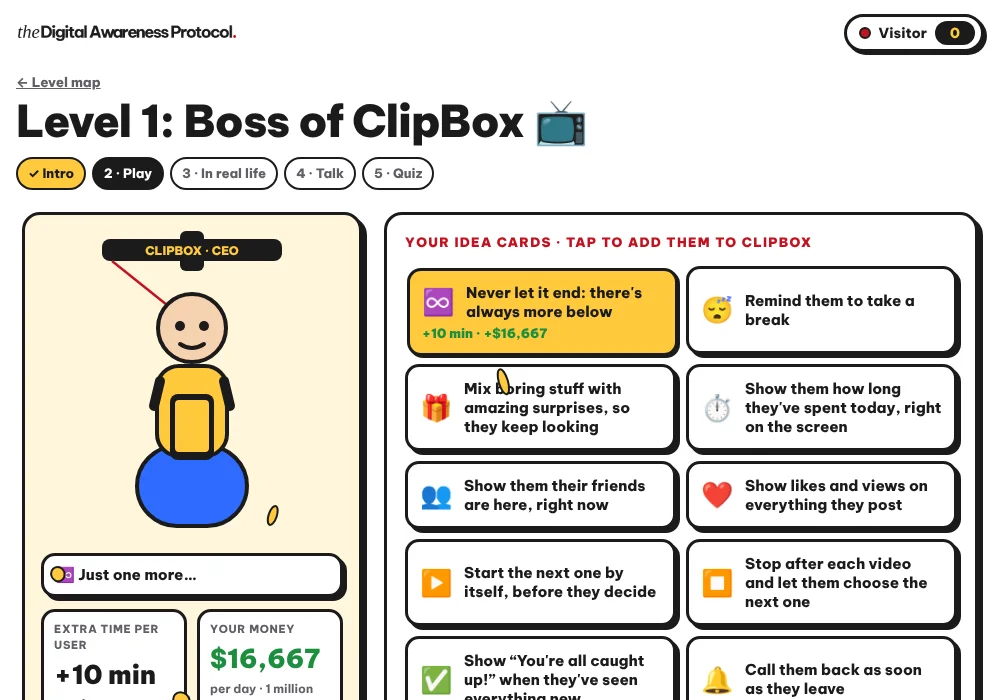
Apps keep kids hooked through precise design choices: endless scroll removes the moments where you might stop, autoplay starts the next video for you, notifications call your child back as soon as they drift away, and streaks, likes and random rewards make them want to return. Once your child can recognise these tricks, they can choose instead of being pulled along, and you can talk about it without frightening them.
Below, each mechanism is explained simply, with a question to ask your child and a setting to try together.
Why do apps want to keep children online?
Because for many free apps, time on screen is money. The longer someone stays, the more ads they see and the more the app learns about what they like. UNICEF explains to parents that social media apps are designed to hold children's attention, with feeds that put engagement first rather than the user's wellbeing (UNICEF Parenting).
This is not a lack of willpower on your child's part. Adults get caught too. The difference is that at 10 or 13, the brakes that help us stop are still being built.
Here is a simple way to make it click. Ask your child to imagine they run an app and earn money for every minute people spend on it. What would they do to keep people there? Very quickly, children invent the tricks below by themselves. I am convinced this is the best way in: a child who has invented a trick spots it far faster than a child who has only been warned about it.
Endless scroll: why is there never an end?
What it is. On feeds of short videos or photos, one swipe brings up the next post. There is no last page and no "end" button.
Why it holds them. In a book, the end of a chapter is a natural moment to stop. Endless scroll removes those moments. You no longer decide to stop: you have to pull yourself away.
The question to ask. "When you're watching short videos, what makes you stop? You, or something outside, like being called for dinner?"
The setting to try together. A time limit on that app, chosen by your child, or a timer set before they start.
Let them take these tricks apart themselves, by playing: lesson 1 is free.Try lesson 1 free with my child →
Autoplay: who picks the next video?
What it is. At the end of an episode or a video, the next one starts on its own after a few seconds.
Why it holds them. Doing nothing is enough to keep going. To stop, you have to act. The app flips the effort around.
The question to ask. "Tonight, how many videos did you choose yourself, and how many just started on their own?"
The setting to try together. Turn off autoplay in the settings of the video or streaming app, where the option exists.
Notifications: why does the phone keep calling them back?
What it is. A message, a like, "a new video from your favourite channel": the phone buzzes or lights up to flag something.
Why it holds them. The notification pulls your child back into the app while they were doing something else. Many are sent to bring them back, not because they are urgent.
The question to ask. "Out of today's notifications, which ones really mattered to you?"
The setting to try together. Go through the apps one by one and keep only notifications from people, not from the apps themselves. In the evening, use Do Not Disturb or a scheduled downtime.
Streaks, likes and random rewards: why do they keep coming back?
Streaks. Some apps count how many days in a row you have exchanged with a friend. Breaking the streak means losing something. So your child comes back to protect it, even when they don't feel like it.
Likes and views. This popularity counter makes them want to check, again and again, how a post is doing.
Random rewards. You never know whether the next video will be funny, or whether the next chest in the game will hold a rare item. It works much like a slot machine: an unpredictable reward makes you want to try once more.
The question to ask. "If your streak stopped tomorrow, what would actually happen?"
What is Europe doing about these tricks?
Public authorities are taking the subject seriously. On 17 September 2026, the European Commission proposed the EU KIDS Act to protect minors online. Among other measures, it targets two of the tricks above on services used by under-18s: infinite scroll without stopping points, and push notifications during sleeping hours (European Commission press release, 17 September 2026).
This is a proposal: the European Parliament and the Council still have to negotiate and agree the final text before it becomes law. It only covers the European Union. Wherever you live, it is at home and at school that children learn to spot these tricks today.
How do you talk about it with your child without scaring them?
- Start from curiosity, not blame. "Did you know people are paid to keep you on this app longer?" sparks far more interest than "you spend your whole life on that phone".
- Acknowledge what they enjoy. A funny video, a game with friends: that pleasure is real. The aim is for them to choose, not to feel guilty.
- Let them pick their settings. Offer a list and let them test two or three for a week. In a McGill University study, participants who made small changes, such as switching the screen to greyscale and keeping the phone out of the bedroom at night, cut their screen time by about an hour a day and reported sleeping better (EurekAlert, 19 May 2022). The study was not specifically about children, but the idea is worth testing as a family.
- Lead by example. Sort through your own notifications the same way, in front of them.
This is exactly what My Digital Awareness does, in class or at home. In "Boss of ClipBox", your child runs an app and picks the ideas that keep people on the screen. Then they discover their ideas already exist, in the apps they use every day. In "The Settings Menu", they try out, on a pretend phone, the settings that switch these tricks off, and keep their own. You can try a game before creating their space.
FAQ
What is endless scroll?
It is a feed of content with no end: one swipe brings up the next post. Because there is never a last page, there is no natural moment to stop.
Can you turn off autoplay?
On several video and streaming apps, yes, in the playback settings. The option and its name vary from app to app, so look for it together with your child.
Should you turn off all of your child's notifications?
Not necessarily. Keep the ones from people (family, friends) and turn off the ones that mainly exist to pull them back into the app. In the evening, downtime or Do Not Disturb protects their sleep.
At what age should you explain these tricks?
As soon as your child uses online videos or games, even on the family tablet. My Digital Awareness is designed for 10 to 15 year olds, an age when many get their first phone.
Let them take these tricks apart themselves, by playing: lesson 1 is free.Try lesson 1 free with my child →

Kawthar Bouachrine is a family therapist and NLP practitioner since 2014, a certified DISC and Driving Forces practitioner (Erudia · Assessments24x7), creator of My Digital Awareness, a programme by The Parenting Protocol™, and founder of Koding Kids, an online coding school for children.