Screen time workshop for students: what it should include
A screen time workshop for students aged 10 to 15 fits into one lesson if it includes four things: an experience the students live through themselves, the names of the tricks they have just experienced, a conversation about what the screen gives them, and one concrete choice they take home. Everything else is optional, and fear can come off the agenda altogether.
I designed the My Digital Awareness workshops and I run them. What follows is the structure I recommend to any school that wants to run its own session, with or without our games.
What should a screen time workshop include?
First, an experience. Students should be doing something within the first ten minutes, before any adult has explained anything. A game, a simulation, a small group challenge: the format matters less than the fact that they act.
Then, words. Once the experience is over, the tricks get their real names: autoplay, infinite scroll, notifications, rewards that land at random. Vocabulary comes after the experience, never before, or it slides off.
Next, a question about needs: what does this app give you? A student who watches videos at night may be looking for a break, for time with friends, or for the feeling of getting good at something. Until that need is on the table, every piece of advice sounds like something being taken away.
Finally, a choice. The workshop ends when every student leaves with a decision of their own, small and specific: a setting to change, or an "if… then…" plan. For example: "if a video starts on its own after 9 pm, then I put my phone outside my bedroom."
How do you teach app design tricks without lecturing?
Swap the roles. Explain infinite scroll to a student and they nod politely. Ask them to design an app that keeps people on it as long as possible, and sooner or later they invent infinite scroll themselves, which they will not forget.
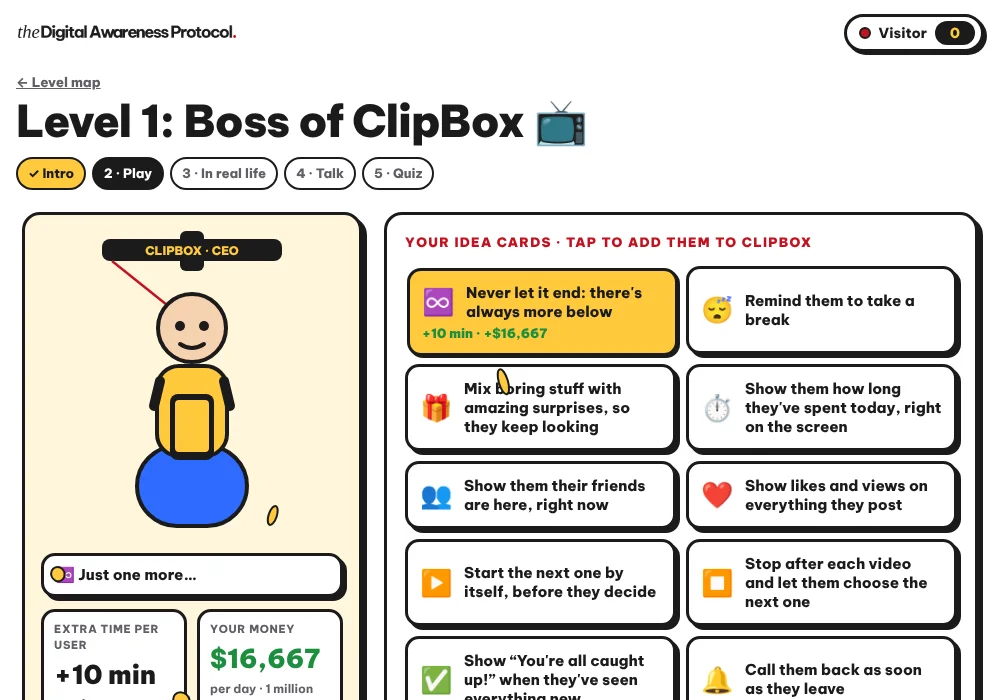
Imagine a Year 7 class split into groups of four. Each group runs a pretend video app and has to come up with three ideas to keep users on it longer. After ten minutes, the ideas on the board will probably look a lot like what real apps already do: the next video that starts by itself, the little red badge, the streak you must not break.
That is the idea behind the game "Boss of ClipBox" in My Digital Awareness: the student runs an app and picks the ideas that keep people on the screen. For random rewards, the game "The Machines" puts two slot machines side by side, and students find out why we stay on the one that pays at random. If you want to brush up on the vocabulary before the session, our article on how apps keep kids hooked walks through each trick.
A ready-to-run workshop per session, a teacher space and an anonymous before / after review: see how your students take screens apart by playing.See My Digital Awareness for your school →
How do you run the session, minute by minute?
Here is the plan I suggest for a 55-minute lesson. You can bring it down to 45 minutes by shortening the discussion.
- Minutes 0 to 5: the starting questions. Three short questions, on paper or on screen, with no names. For example: "Name one trick an app uses to keep you on it." These answers become your baseline.
- Minutes 5 to 20: the game. Students play alone or in pairs, or the whole class plays with the teacher on one screen. The adult watches and corrects nothing.
- Minutes 20 to 30: "in real life". Link what they did in the game to the apps they know. This is when the tricks get their names.
- Minutes 30 to 42: the discussion. One question drives this part: what does the app give me, and do I actually want that right now? Nobody has to talk about themselves.
- Minutes 42 to 50: the choice. Each student writes down their own setting or "if… then…" plan. They share it only if they want to.
- Minutes 50 to 55: the quiz and the note for home. A quick quiz checks what stuck, and every student leaves with a card for their parents.
The My Digital Awareness games follow the same logic, in five steps: intro, play, "in real life", talk, then a quiz. Common Sense Education, together with the Center for Digital Thriving at Harvard Graduate School of Education, offers digital well-being lessons for middle school that run 40 to 45 minutes and are designed to build students' agency, beyond simply taking a break from their phones (Common Sense Education, Digital Well-Being Lessons for Grades K-12). One class period is plenty, as long as you do not fill it with slides.
Which mistakes should you avoid in a screen time workshop?
The first is the shock video. I will say it plainly: a frightening video keeps a class busy for five minutes and is gone by break time, while a game students took apart themselves comes back to them weeks later, at the exact moment the next video starts playing on its own.
Fear shuts the conversation down. Students who feel targeted go quiet, and they are often the ones you most wanted to reach.
The second is guilt. A student who spends three hours a night on a game is up against apps built by entire teams to hold on to them.
Saying so changes the tone of the room. The student can then look at their own evening with curiosity instead of defending it.
The third is shrinking the topic to screen time. Counting hours says nothing about what happens during those hours. Two students can spend the same time on their phones and live very different things, one on a call with a cousin, the other scrolling through videos they never chose.
The last mistake is quieter: asking students to describe their habits in front of the whole class. Honest answers come when a student knows those answers will stay theirs. In My Digital Awareness, parents never see their child's answers, for that very reason.
Should the workshop change between ages 10 and 15?
Yes, mostly in the examples. Around 10 to 12, many students do not have their own phone yet, or have only just got one. Videos and video games make the strongest examples, and the timing is good: before habits have set.
Between 13 and 15, social media and group chats take up more room. Students this age dislike being told what to do, but they love picking apart how an app is built. Give them the role of the expert who takes the product apart, and let them argue it out among themselves.
How do you bring families in after the session?
What a student understood in class gets replayed that evening at home. If parents do not know what was discussed, they may fall back on exactly the kind of message the workshop avoided.
The simplest step is a short card sent home after each session. In My Digital Awareness, each family receives a "how to talk about it" card: two questions to ask, one sentence to avoid, a family challenge. For parents who want to move on to settings, you can also share our guide on how to set screen time on iPhone and Android.
How can you tell whether the workshop worked?
Ask the same questions before and after, anonymously. Compare the class's answers, never one student's. A class that laughed a lot and talked a lot has not necessarily learned anything new.
Pick questions that check understanding, not opinion. "Name one trick an app uses to keep you on it" measures something. "Are screens dangerous?" only measures how well students guess the expected answer.
There is another sign you cannot put a number on: in the following weeks, students who say, unprompted, "that's infinite scroll." When the vocabulary leaves the classroom, the workshop has done its job.
That is what we set out to make simple with My Digital Awareness: 7 workshops for ages 10 to 15, more than 20 games, students playing on tablets or computers, alone or in pairs, and, when there are not enough devices, a teacher playing with the whole class on their own screen. The teacher space lets you follow each student's progress, print certificates and run the anonymous before / after review. Our approach fits in one line: understanding rather than banning, no fear, no guilt.
FAQ
How long should a screen time workshop for students be?
One class period is enough if the session stays focused on an experience and a concrete choice. Common Sense Education's digital well-being lessons for middle school run 40 to 45 minutes.
Does every student need a device?
No. With My Digital Awareness, students play on tablets or computers, alone or in pairs. When there are not enough devices, the teacher plays with the whole class on their own screen.
Is an outside speaker better than the class teacher?
An outside speaker brings a fresh face, but leaves the same day. The teacher knows the students and can pick the vocabulary back up in the weeks that follow, so with a ready-to-run workshop the teacher is often the best person for the job.
Is one session enough?
A well-run session opens the conversation and gives students a first setting to change. For the habits to last, it is better to come back to the topic several times during the year, with a different theme each time.
Should the workshop cover serious situations online?
Yes, but in a separate session, so it does not colour everything else. In My Digital Awareness, the workshop "If It Happens To Me" covers the right moves if something serious happens online.
A ready-to-run workshop per session, a teacher space and an anonymous before / after review: see how your students take screens apart by playing.See My Digital Awareness for your school →

Kawthar Bouachrine is a family therapist and NLP practitioner since 2014, a certified DISC and Driving Forces practitioner (Erudia · Assessments24x7), creator of My Digital Awareness, a programme by The Parenting Protocol™, and founder of Koding Kids, an online coding school for children.